Workflow Execution — Architecture and UI Reference
This document covers the workflow execution model, the run execution view, the approval gate, and the Workflows page run-management UX.
Workflows Page (src/pages/Workflows.tsx)
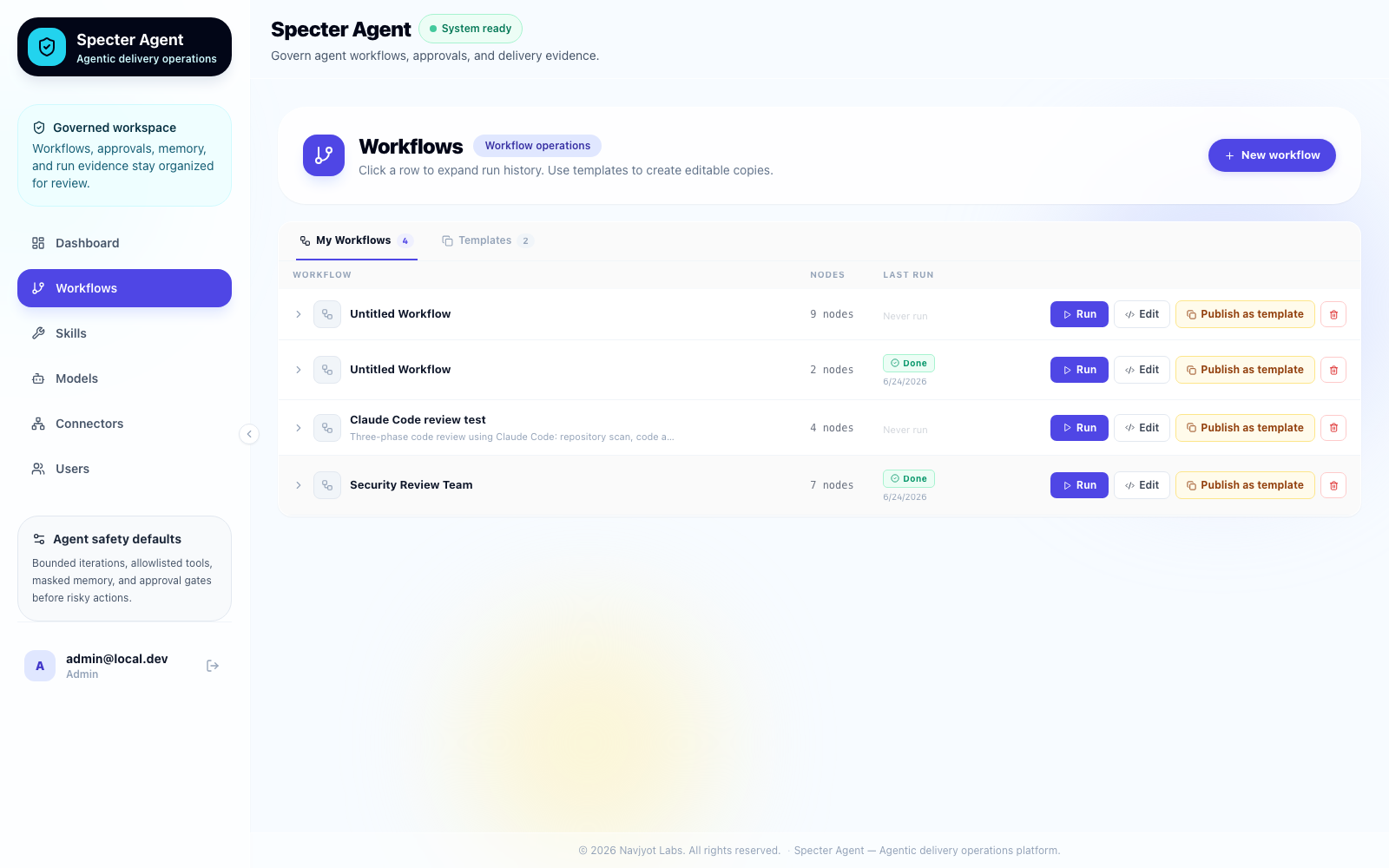
Layout
- My Workflows tab — user-created workflows, runnable, editable, publishable.
- Templates tab — shared templates; "Use template" copies to a new editable workflow.
- Each row expands inline to show run history when clicked anywhere on the row.
Only the actions cell (
<td>) stops propagation to prevent accidental expansion.
Active-run locking
When a workflow has a run with status running, queued, or waiting_approval,
the row enters a locked state:
- Run button — disabled, grey, shows a spinner and status text ("Running…" or "Awaiting approval…").
- Edit button — disabled, 50% opacity,
cursor: not-allowed, tooltip "Cannot edit while a run is active". - Publish as template button — disabled with same treatment.
This prevents concurrent runs and editing a live workflow graph mid-execution.
Run history panel
Clicking a row expands an inline history panel showing up to 20 recent runs per workflow, each with status badge, start time, and a link to the full run view.
Workflow Builder (src/pages/WorkflowBuilder.tsx)
The Builder is a three-column layout: a drag-and-drop palette on the left, a
React Flow canvas in the center, and a per-node inspector on the right (the
inspector is drag-resizable from its left edge). A breadcrumb
(Workflows › <name>) links back to the list, and the toolbar includes
Tidy layout (auto-arranges nodes into topological columns), template
loading, an auto-save toggle, and Run/History actions. Deleting a selection
from the toolbar asks for confirmation; keyboard Delete stays immediate.
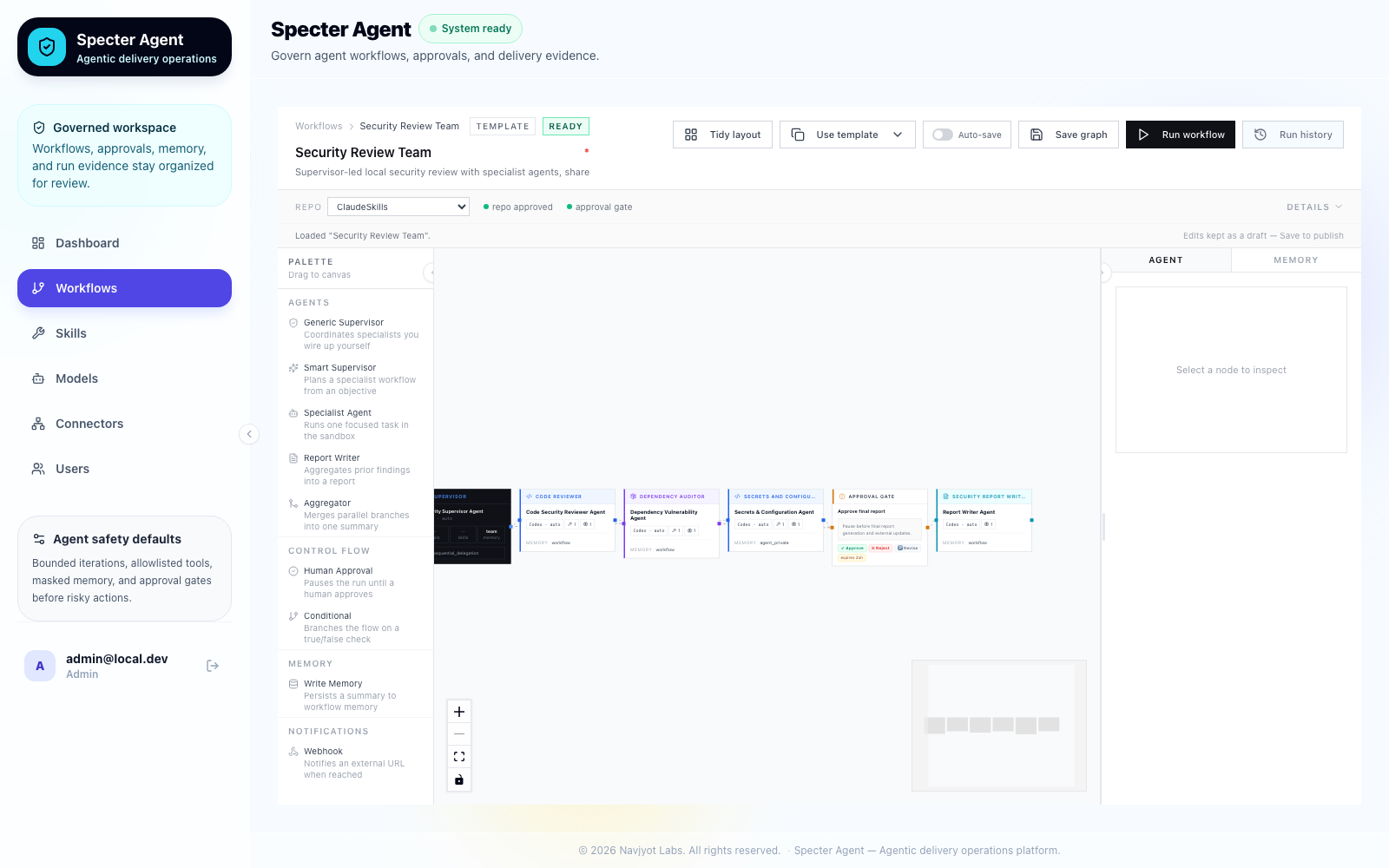
The palette groups nodes by category (each item shows a one-line description):
- Agents — Generic Supervisor, Smart Supervisor (LLM-driven planning), Specialist Agent, Report Writer (pre-attaches the "Standard Report Format" skill), Aggregator (combines parallel-branch outputs).
- Control Flow — Human Approval, Conditional (branches the graph on a yes/no LLM judgment; its true/false edges are labeled in green/red on the canvas).
- Memory — Write Memory.
- Notifications — Webhook (POSTs a payload to an external URL).
Clicking a node opens its config in the right-hand Agent tab. Required fields (Label, Objective) are marked with a red asterisk and show a validation message when empty:

Notable fields:
- Skills — reusable prompt fragments, applied to the agent's prompt before System Instructions. Attaching a skill shows a hint under System Instructions ("N skill(s) attached — its instructions are included automatically"). Ten SDLC skills ship built-in — Secure Code Review, PR-Readiness Review, Performance Review, Dependency Risk Audit, Secrets & Config Review, Test Gap Analysis, Error Handling & Observability Review, Release Notes Writer, Breaking Change Detector, Deployment Risk Assessment, plus Standard Report Format — all editable in the Skills page (edits survive restarts; deleted built-ins are re-seeded).
- Runtime — execution mode (Docker Sandbox vs. Direct CLI), agent (Codex / Claude Code / Cursor), and a model dropdown scoped to the selected agent's real model list.
- Memory scope —
workflow/team/agent_private; determines who can read this node's output back via memory in later steps. - Max iterations — retry attempts on failure (
1= no retry). - MCP Tools — read-only. MCP servers are configured globally per agent CLI in Connectors, not per node, so this list is informational rather than an editable per-node selection.
WorkflowRun Page (src/pages/WorkflowRun.tsx)
The execution view is a three-panel layout:
┌──────────────┬───────────────────────────────┬─────────────────┐
│  Left pane   │        Canvas (React Flow)     │   Right pane    │
│  Step list   │        Node execution graph    │   Log drawer    │
│  (foldable)  │                                │  (resizable)    │
└──────────────┴───────────────────────────────┴─────────────────┘
│                    Run log panel (drag-resizable)               │
└─────────────────────────────────────────────────────────────────┘
Left pane
- Lists all workflow steps with status icons.
- Collapses to a 40 px strip showing status icon circles.
- Clicking a circle in collapsed mode expands the pane and selects that step.
Right pane (LogDrawer)
- Resizable: drag the left edge handle between 280–700 px.
- Shows step detail, agent output, and the approval panel when the selected step is a Human Approval gate.
- Root element has
minWidth: 0; overflow: hiddenand output div haswordBreak: break-wordto prevent text clipping when the pane is wide.
Run log panel
- Pinned at the bottom, drag-resizable between 80–500 px via a top-edge handle.
- Show/Hide toggle button to collapse entirely.
- Each log entry has a colored dot matching the node's parallel lane color.
Parallel Lane Color Coding
All nodes at the same topological depth (i.e., running in parallel) share a color. This color is applied consistently across the entire UI:
| Surface | How color is applied |
|---|---|
| Canvas node | 3 px left-edge color bar on ExecNode |
| Flow edge | Stroke color + animated glow dot on FlowEdge |
| Run log entry | Colored dot next to each log line in RunLogPanel |
| Sidebar step card | Left border in LogDrawer |
Implementation
// topoLayout() returns { nodes, colMap }
// colMap: Record<nodeId, topoColumn>

const LANE_COLORS = ["#7c3aed","#2563eb","#0891b2","#059669",
                     "#d97706","#dc2626","#7c3aed","#0f766e"];

function laneColor(col: number): string {
  return LANE_COLORS[col % LANE_COLORS.length];
}
Human Approval Gate
Builder configuration (AgentInspector.tsx)
Three fields stored in the node's data object inside the workflow graph JSON:
| Field | Type | Default | Description |
|---|---|---|---|
allowedActions | string[] | ["approve","reject","request_revision"] | Which action buttons appear in the runtime approval UI |
noteRequired | boolean | false | Whether the reviewer must enter a note before any action is available |
timeoutHours | number | 24 | Hours before a pending approval expires and cancels the workflow |
The gate configuration is persisted in the workflow graph JSON. Each runtime
approval request also stores its concrete expires_at timestamp in SQLite.
Canvas card (HumanApprovalNode.tsx)
- Renders colored action chips for each entry in
allowedActions. - Shows an amber "note required" tag when
data.noteRequiredis true. - Shows the configured timeout window.
Runtime approval UI (WorkflowRun.tsx → LogDrawer)
- Note textarea always visible.
canSubmitistrueonly when: note is non-empty ifnoteRequired, and a valid action is selected, and the approval has not expired.- Action buttons are rendered only for actions present in
allowedActions. - Shows the approval expiry deadline. Once expired, the approval can no longer be submitted.
Backend endpoints (internal/api/runs.go)
All three endpoints accept { note: string } in the request body and persist
the note to approval_requests.resolution_comment.
| Endpoint | Effect |
|---|---|
POST /workflow-runs/{run_id}/approve/{approval_id} | Sets approval status approved |
POST /workflow-runs/{run_id}/reject/{approval_id} | Sets approval status rejected |
POST /workflow-runs/{run_id}/request-revision/{approval_id} | Sets approval status revision_requested, marks run failed |
Pending approvals are expired before they are listed or resolved. Expiry sets
the approval status to expired, cancels the waiting step, and marks the
workflow run cancelled, so execution cannot proceed after no response.
API client (src/lib/api.ts)
approveRun(token, runId, approvalId, note?)
rejectRun(token, runId, approvalId, note?)
requestRevision(token, runId, approvalId, note?)
Backend Parallel Execution (internal/runner/, internal/graph/levels.go)
The runner walks the graph level by level instead of node by node. Each level is a set of nodes whose dependencies are already satisfied, so they have no ordering constraint relative to each other.
topological_levels(nodes, edges) -> list[list[node]]
- Depth of a node =
max(depth of its parents) + 1(Kahn's algorithm, same math as the frontend'stopoLayout/colMap). humanApprovalnodes are always split into their own singleton level, so the existing pause/resume/expiry machinery is untouched — a level either contains only agent/memory nodes, or exactly one approval gate.
Within a level, _run_level(...) executes nodes concurrently via
ThreadPoolExecutor, bounded by MAX_PARALLEL_NODES (default 3):
- A level with 1 node (or
max_parallel <= 1) runs inline — no thread pool overhead. - Each node's summary is appended to
accumulated_contextonly after the whole level joins, in deterministic node order — no cross-thread mutation during execution. - If any node in a level fails, its siblings are allowed to finish first, then
the run is marked
failed. This means resume-after-fix only has to re-run the failed node — completed siblings are skipped via_latest_step_for_node. - Cancellation is checked between levels; in-flight nodes are killed by their
own progress-poller (
_poll_progress→_kill_job) once it observes the run's status flip tocancelled.
Turning parallelism on
Concurrency is driven by the supervisor node's delegationStrategy:
delegationStrategy | MAX_PARALLEL_NODES | Behavior |
|---|---|---|
sequential_delegation (default) | 1 | Levels still computed, but always run one node at a time — identical to the old sequential runner. |
parallel_delegation | 3 | Nodes sharing a dependency frontier run concurrently, up to 3 at once. |
Set this in the Builder → select the Supervisor node → Agent tab → Delegation strategy.
Smart Supervisor Planning (internal/planner/)
Instead of hand-wiring every specialist node, the Supervisor Agent can decompose an objective into a subgraph automatically, using its own configured CLI agent (Codex / Claude Code / Cursor, direct or sandboxed).
Flow
- In the Builder, select a Supervisor Agent node and fill in its Objective field (e.g. "Do a full security review of this repo: code, dependencies, secrets, ending in a report").
- Click Plan workflow. The backend runs the supervisor's agent inside the selected workspace with a planning prompt (see below), parses its JSON response, and returns a specialist subgraph.
- The frontend lays the generated nodes out to the right of the supervisor
(
layoutGeneratedSubgraphinsrc/lib/graph-layout.ts, built on the sametopoLayoutcolumn math used by the run view) and merges them into the canvas. The generated workflow is auto-saved to the database, so it's immediately runnable from the UI,specter run, or the API — no separate "publish" step. - Review/edit the generated nodes like any other node. Two refinement paths:
- Refine plan (on the supervisor): free-text feedback regenerates the whole generated subgraph, replacing it in place.
- Tune with prompt (on each generated specialist): a short instruction
rewrites just that node's
label/role/objective/systemInstructions.
Generated graph shape
Every node/edge the planner creates is tagged data.generatedBy: <supervisorNodeId>,
so re-planning or refining only touches nodes it created — manually added
nodes and edges are never removed.
{
  "id": "gen-sup-1-code-review",
  "type": "specialistAgent",
  "data": {
    "label": "Application Code Security Reviewer",
    "role": "Secure code review",
    "objective": "Review auth middleware and API routes for injection and access-control flaws.",
    "runtime": "direct",
    "sandboxAgent": "codex",
    "generatedBy": "sup-1"
  }
}
Edges chain specialists per their depends_on; specialists with no
dependencies connect directly from the supervisor. The planner may also emit
a humanApproval node (gating the risky/final steps) and a memory node
(durable summary) when warranted — both wired downstream of the specialists
they cover.
Endpoints (internal/api/workflows.go)
| Endpoint | Purpose |
|---|---|
POST /workflows/plan | {objective, supervisor_node_id, runtime, agent, workspace_path, system_instructions?, current_plan?, feedback?} → {nodes, edges}. current_plan+feedback trigger a refinement instead of a fresh plan. |
POST /workflows/plan/tune-node | {node_data, instruction, runtime, agent, workspace_path} → updated {label, role, objective, systemInstructions} for one node. |
Both call the host runner directly (/runtimes/direct-cli/run or
/runtimes/docker-sandbox/run, whichever the supervisor is configured for),
same dispatch path as normal node execution. Planning responses are validated
strictly: JSON must be extractable (fenced or bare), every depends_on must
reference a real subtask, and the dependency graph must be acyclic — bad
output surfaces as 422 with a human-readable message instead of a garbled
canvas.
Example: security review, end to end
# 1. Supervisor objective (set in the Builder UI):
#    "Do a full security review of this repo: source code vulnerabilities,
#     dependency risks, and secrets handling, ending in a consolidated report."
#    Supervisor delegation strategy: parallel_delegation

# 2. Click "Plan workflow" — the supervisor (Codex, direct) inspects the repo
#    and returns something like:
#      code-review, deps-audit, secrets-config, infra-deploy, test-qa   (parallel)
#        └──────────────────────┬───────────────────────────────┘
#                          report (depends on all five)
#                     approval gate (after all five)
#                        memory synthesis (final)

# 3. Save happens automatically. Trigger it like any other workflow:
specter run "Full Security Review" --repo /path/to/target/repo

# The five specialists run concurrently (parallel_delegation), the report
# waits for all of them, a human approval gate pauses before the summary is
# written to memory.
Run Lifecycle
queued → running → completed
                 → failed
                 → cancelled
                 → waiting_approval → (approve) → running → completed
                                    → (reject)  → failed
                                    → (revise)  → failed
Run status is polled from GET /api/workflow-runs/{run_id} by the
WorkflowRun page using TanStack Query with a 2-second refetch interval while
the run is active.
Terminal Execution
specter run <workflow-id-or-name> --repo .
The run executes in that process. There is no server to reach, no token to mint, and no run id to poll — the binary reads the database directly and writes its progress there, which is why the same run appears in the web UI while it happens.
specter run <workflow-id-or-name> --repo . --json
Behaviour:
- Resolves the workflow by id, exact name, or slugified name.
- Refuses a repository that is not an approved workspace, before any agent is spawned.
- Gives the run its own
git worktree, so the agent never touches your checkout. - Confines the agent to that worktree via
sandbox-execorbwrap, and says so when no mechanism is available rather than implying one. - Read-only unless
--writeis passed; a write run arrives as a pull request rather than as edits already applied to your branch. - Exits
0only when the workflow completes. Non-zero for failed, cancelled, timed out, unapproved workspace, or missing workflow. --jsonprints a machine-readable result; the live tree is used only on a terminal, andNO_COLORis honoured.- Ctrl-C cancels the run and kills the agent subprocess rather than orphaning it.
Project-level CLAUDE.md or AGENTS.md gate example:
Before production build, release, or high-risk code change, run:

specter run security-review-team --repo . --json

Proceed only if the command exits 0.
Earlier versions carried a caveat here: the wrapper was a long-blocking process,
and some coding-assistant harnesses schedule long-running shell commands in the
background instead of waiting — so an assistant could commit before the gate
finished. specter run is one synchronous command whose exit code is the
verdict, so the workaround that caveat pointed at is no longer needed.
Pre-commit Gate for Coding Assistants
scripts/precommit-gate/ is a distributable scaffold for gating commits on a
Specter workflow — in other repositories, driven either by a real git hook
or by a coding assistant.
| File | Purpose |
|---|---|
scripts/precommit-gate/SKILL.md | Copy into a target repo's .claude/skills/ (or the user's global ~/.claude/skills/) so a coding assistant runs the gate. |
scripts/precommit-gate/pre-commit | Copy into a target repo's .git/hooks/pre-commit (chmod +x) as the real enforcement layer. |
Both paths run the same command — specter run "$SPECTER_WORKFLOW" --repo . —
and require the same setup: the target repo registered as an approved Specter
workspace, and SPECTER_WORKFLOW set in the environment. SPECTER_HOME must
match whatever the rest of the install uses, or the gate reads a different
database and reports that the workflow does not exist.
No token and no API base URL: the binary reads the database directly, so there is nothing to authenticate against.
The pre-commit hook script skips (exit 0) with a warning if
SPECTER_WORKFLOW_ID is unset, so copying the file speculatively doesn't
break commits before setup is finished.
Worked example (real captured output)
Starting a run — POST /api/workflow-runs:
// request
{"workflow_id": "security-review-team", "workspace_path": "/path/to/repo"}

// response
{
  "run_id": "42284fac-76a1-447c-8256-d505caf47fa2",
  "status": "queued",
  "workflow_id": "security-review-team",
  "workspace_path": "/path/to/repo"
}
Polling — GET /api/workflow-runs/{run_id} — a few seconds later, mid-run:
{ "id": "42284fac-76a1-447c-8256-d505caf47fa2", "status": "running", ... }
Terminal states look like:
{ "status": "completed", "completed_at": "2026-07-09T22:27:44Z", ... }   // gate passed
{ "status": "failed",    "completed_at": "2026-07-09T22:27:44Z", ... }   // gate failed
On failure, GET /api/workflow-runs/{run_id}/logs gives the reason. Real
output from the run above (a Codex sandbox agent hit its usage limit):
info  | Starting sequential run: 6 nodes across 4 levels.
info  | Starting node: Security Supervisor Agent
info  | [Security Supervisor Agent] [sandbox] creating Codex sandbox · ...
error | Node Security Supervisor Agent: failed
error | Run failed at node: Security Supervisor Agent
The assistant (or hook) should surface which node failed and why, not just report a bare "failed" status.
Removed Pages
The following pages were removed — do not re-add routes or nav entries for them:
| Page | Removed because |
|---|---|
src/pages/Runs.tsx (/runs) | Run history is now inline in Workflows.tsx |
src/pages/Approvals.tsx (/approvals) | Approvals are handled in WorkflowRun.tsx |